How to find unscheduled treatment in OpenDental (and what to do with the list)
The exact clicks, the filters that matter, why the dollar column lies to you, and how the list becomes phone calls instead of a spreadsheet.
The short answer: in OpenDental the unscheduled treatment list lives under Reports, then Standard Reports, in the Treatment Finder, with two useful cousins in the Appointments module, the Planned Appointments Tracker and the Unsched List. What none of them tell you is who to call first, or whether anyone called at all. That part turns out to be the whole job, so let's do the clicks first and the judgment after.
Pulling the list, step by step
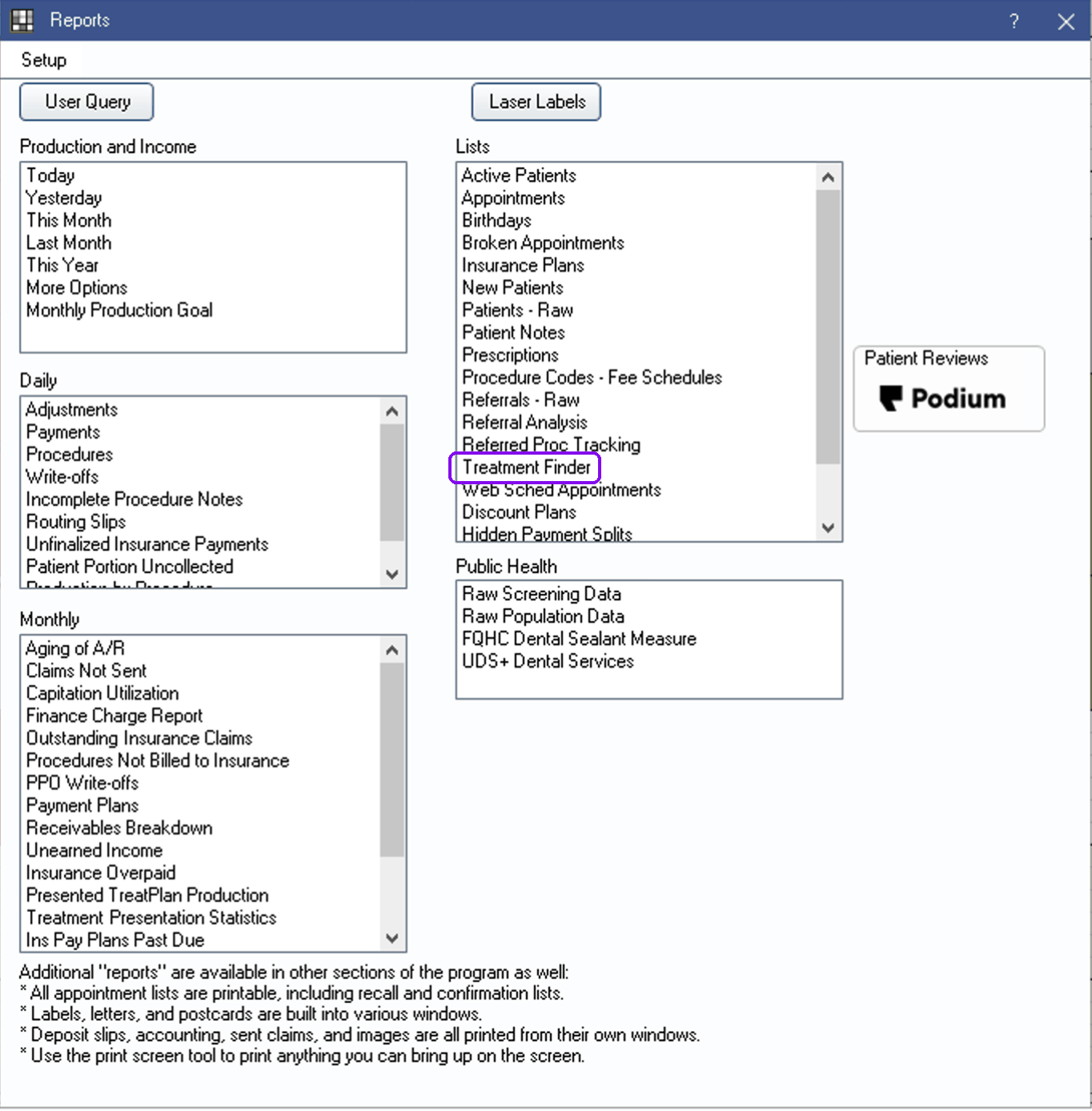
1. Open Reports, then Standard Reports. The window that opens groups everything into columns. Look under Lists, between the production and monthly reports, for the Treatment Finder. It sits quietly in the middle of that column, which is roughly why it gets ignored: nobody's month is graded on it.
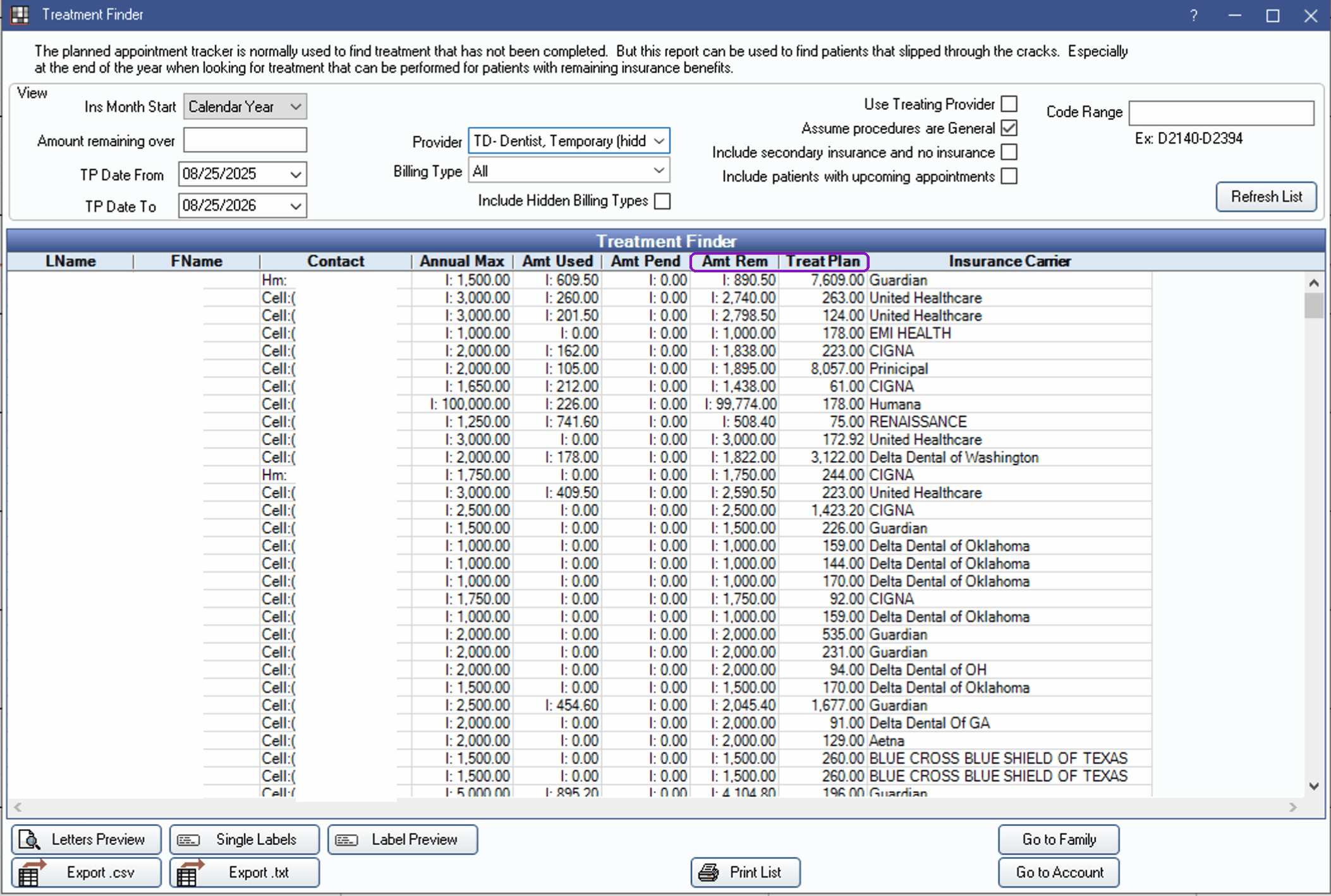
2. Set the view before you refresh the list. The filters that matter: the TP Date From / TP Date To range (when the treatment was planned), the provider and billing type, and a code range if you only want certain procedures. Two settings deserve special attention. Leave "Include patients with upcoming appointments" unchecked, or you'll be calling people who are already on the books, and the front desk learns to distrust the list by the third call. And the "Amount remaining over" field filters by insurance benefits still available, which is why this report earns its keep every fourth quarter: it finds patients whose benefits expire in December. Not every plan year ends in December, though, so verify before promising a patient anything; the year-end dental benefits call list covers who to call first and what to check with the carrier.

3. Refresh the list and read the columns for what they are. The grid is mostly insurance math: each patient with their contact info, then annual max, benefits used, benefits pending, benefits remaining, and finally the value of their treatment plan and the carrier. That column order tells you what the report was built for: patients with unfinished treatment and money left on their benefits. The Treat Plan column is the one that gets summed up and quoted in meetings, and we'll get to why that number needs a haircut.
4. Check the two lists the Treatment Finder misses. In the Appointments module, the Planned Appointments Tracker shows appointments that were planned but never put on the schedule, and the Unsched List shows appointments that made it onto the schedule and then got broken. OpenDental's own description of the Treatment Finder points at this split: the tracker is the everyday tool, and the Finder catches the patients who slipped through the cracks. Different lists, different phone calls: one patient never committed to a time, the other committed and fell off. If you only work the Treatment Finder, the broken appointments quietly rot.
5. Export it. The Export .csv button at the bottom of the report hands you a file Excel opens directly. If you run more than one office, export per clinic so each front desk gets a list that is actually theirs. Then note the date on it, because from this moment the list is aging: every day that passes, somebody on it books elsewhere, moves, or forgets why they needed the crown.
How to read it without fooling yourself
The report mixes three very different situations into one list: treatment that was diagnosed, treatment that was actually presented to the patient, and treatment the patient accepted and never scheduled. OpenDental marks a procedure as treatment planned the moment it goes on a plan. "TP'd" does not mean the patient ever heard a price or said yes. Some rows are a five-minute scheduling call; some are a case presentation that hasn't happened yet. Your front desk needs to know which is which before dialing, and the chart notes are where they find out.
The summed treatment plan column is the number that gets quoted in meetings, and it is the least trustworthy number in the building. It adds up full fees on every open plan, including plans from years ago, superseded plans for the same tooth, and patients who have moved away. Treat it as a ceiling, not a forecast. Before you repeat the number to a partner or a board, spot check a sample of charts and discount for acceptance, write-offs, and the people you will never reach. If you want a defensible version of that number for your own group, the free unscheduled treatment value calculator walks through those discounts one input at a time.
The report is not the work. A list nobody calls is just a spreadsheet with a big number at the bottom and a schedule that stays empty anyway.
Turning the report into a call list
A raw export is not workable. Sorting is what turns it into one. Sort by a blend of value and recency: recent diagnoses close at a much better rate than three-year-old ones, and a modest filling for a patient seen last month usually beats a large case from 2023. Cut the list to what a front desk can actually finish between check-ins, and make that a daily standard: a number you set, worked every morning, done or not done. It's the same discipline your hygiene recall list needs, and the two lists together are most of the morning's phone work. Then log every outcome back into OpenDental in the commlog, because a call that isn't logged will be made again next month by someone else, to a patient who already said no.
Where this breaks at three or more offices
One office can run this on discipline. At three or more, the seams show: every office manager sets the filters a little differently, the exports live in five different spreadsheets, the lists go stale mid-week, and nobody reconciles what was called against what actually got booked. This is the exact problem we built our patient outreach engine to close: one ranked list per office every morning, from the same rules, with outcomes logged where a manager can see them. But the report above is where everyone starts, and you should start there too.
Reports > Standard Reports > Treatment Finder, filtered to patients with no future appointment, plus the Planned Appointments Tracker and Unsched List. Discount the total, sort by value and recency, give each office a daily number, and log every call. The report is the easy part.
Does OpenDental have an unscheduled treatment report?
Yes. The main one is the Treatment Finder, under Reports and then Standard Reports in the Lists column. It lists patients with treatment-planned procedures and lets you exclude patients who already have an upcoming appointment. The Appointments module adds two more lists: the Planned Appointments Tracker for planned appointments that were never scheduled, and the Unsched List for appointments that were on the schedule and got broken. Each list catches a different kind of unscheduled patient.
What is the difference between the Treatment Finder and the Unsched List?
The Treatment Finder shows patients with treatment-planned procedures and no appointment to complete them. The Unsched List shows appointments that were scheduled and then broken or set aside. Both patients need a call, but it is a different conversation: one never committed to a time, the other committed and fell off the schedule.
Why does the unscheduled treatment total look so large?
The treatment plan column sums full fees on every open plan, including stale plans, superseded plans for the same tooth, and patients who have moved or gone elsewhere. Treat the total as a ceiling, not a forecast. Before quoting it to anyone, spot check a sample of charts and discount for acceptance, write-offs, and patients you will never reach.
How often should we run the unscheduled treatment report?
The list goes stale the day you export it, so the groups that get value out of it work it daily rather than pulling it monthly. A monthly pull turns into a campaign: a big push, a busy week, and then nothing. A short list worked every morning keeps the schedule full without the heroics.
None of this requires new software, just the discipline to run the same report the same way in every office and to treat the calls as the day's work rather than a rainy-day project. When the discipline gets expensive to maintain by hand, that's the moment to automate it, not before.
More from the library

Rather see it than read about it?
Book a 30-minute walkthrough and we will run it on your own offices.
or email us at info@mydentalforce.com