How to run hygiene recall in OpenDental (recall list, intervals, and a daily standard)
The list is the easy part. The intervals behind it decide whether it means anything, and the daily habit decides whether the chairs stay full.
The short answer: the Recall List opens from the Appointments module in OpenDental, and it shows every patient due or overdue for hygiene by recall type and interval. The longer answer is that the list is only as good as the recall setup behind it, and in most multi-office groups I've looked at, that setup was done once, years ago, by someone who no longer works there.
Get the setup right before you trust the list
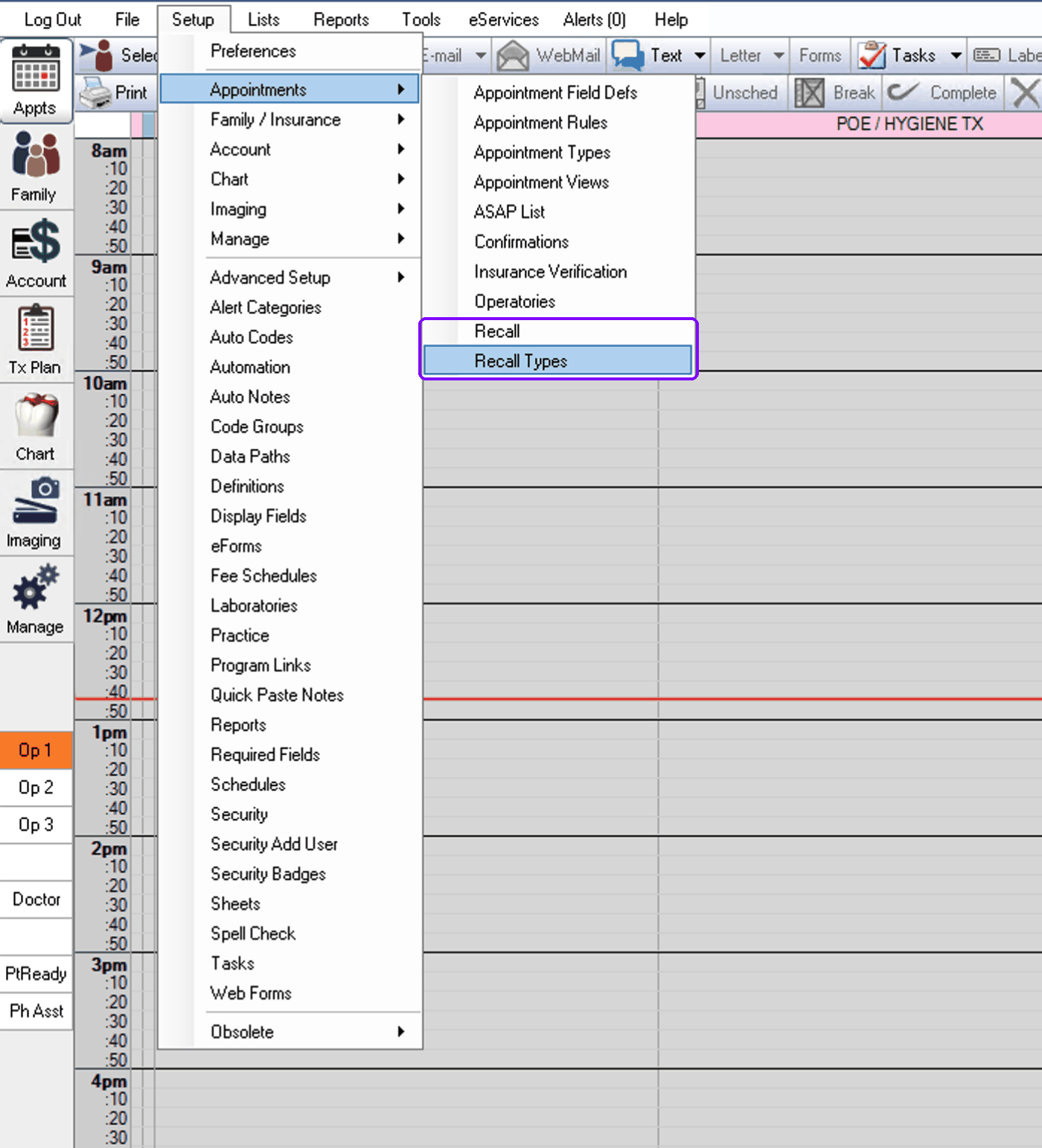
OpenDental drives recall off two things: recall types (prophy, perio maintenance, child prophy, exams) and the interval attached to each one, either as the type's default or as an override on the individual patient. Both live under Setup > Appointments: Recall Types defines the types, their trigger procedures, and their intervals, and the Recall entry right above it holds the list defaults and reminder templates we'll get to below.
Each type is triggered by procedure codes: complete a prophy and OpenDental sets the next due date from the interval. In the setup below, Adult Prophy runs at 6m1d, Perio at 3m1d as its own special type, and the x-ray types ride longer cycles of their own. That "plus one day" is the detail worth copying: it keeps the next visit from landing one day inside an insurance eligibility window and turning into a surprise bill.
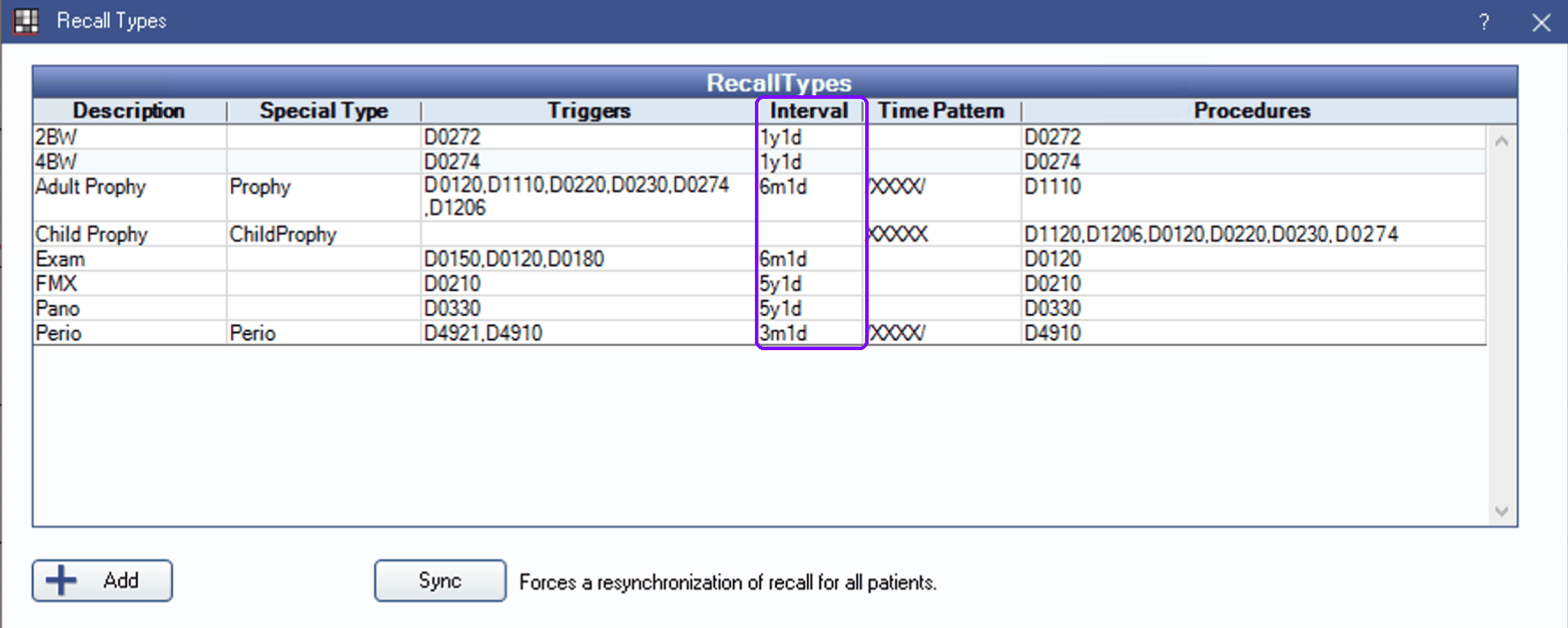
Two setup details do most of the damage when they're wrong. First, the per-patient override: perio maintenance patients belong on the perio type with its shorter interval, not on the practice default. When nobody maintains those records, your perio patients quietly drift onto six-month schedules, and the first sign is hygienists complaining about what's in their chairs. Second, when you fix any of this, use the Sync button at the bottom of Recall Types: it forces a resynchronization of recall for every patient, so the corrections actually propagate instead of applying only to patients touched afterward.
And the classic failure: patients with no recall type attached at all. They never come due, they never appear on any list, and they simply evaporate from your hygiene program. If your recall list looks suspiciously short for your active patient count, this is almost always why.
Running the list
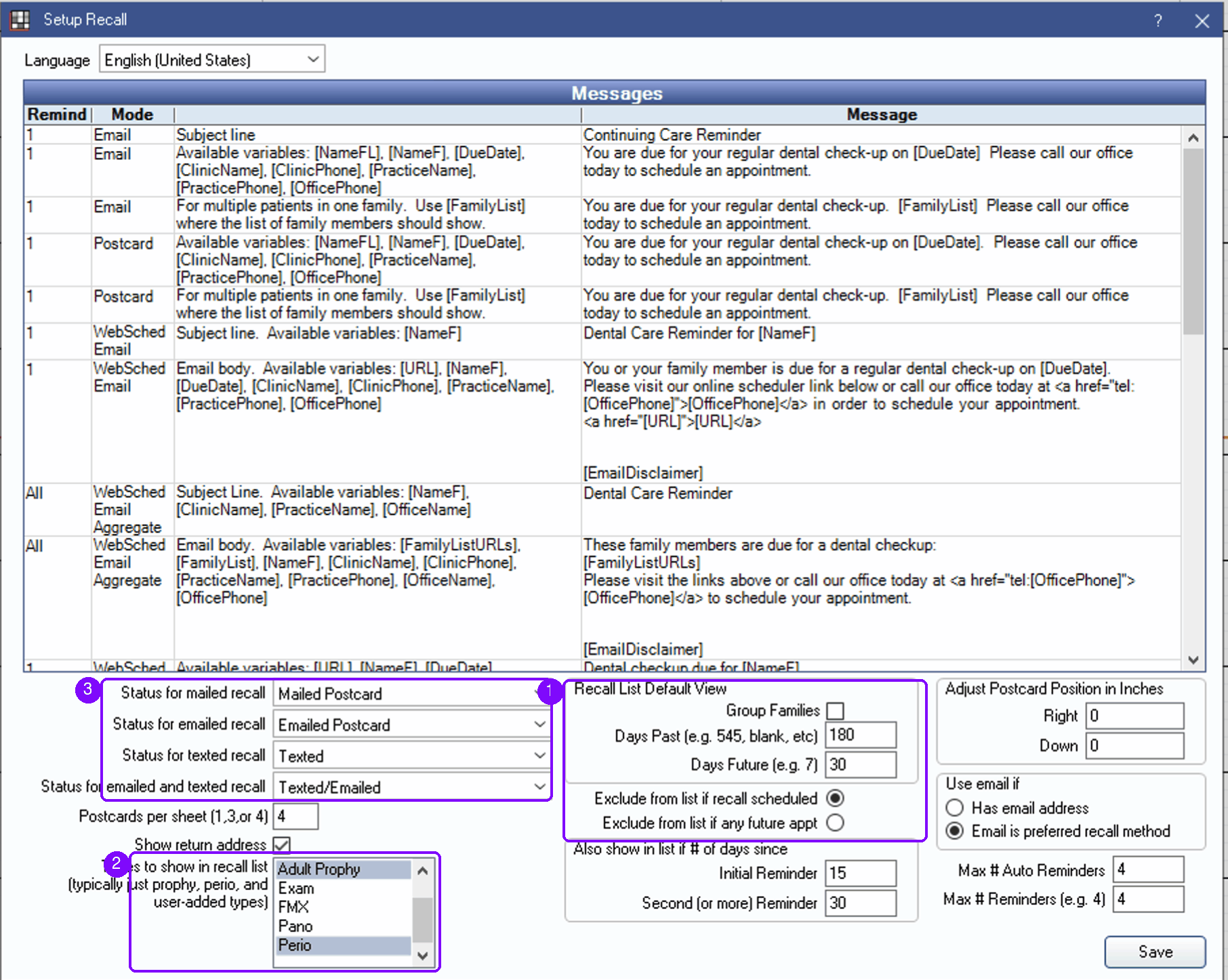
Open the Recall List and set the date range. OpenDental frames it as Days Past and Days Future: looking backward gives you the overdue backlog, looking a few weeks forward gives you the patients you can still catch before they lapse. The defaults live in Setup > Appointments > Recall, along with two settings worth a deliberate choice: which recall types show on the list (typically prophy and perio, not every x-ray cycle), and whether a patient drops off the list when their recall is scheduled or only when they have any future appointment at all.
From there, filter by clinic and provider if you run multiple offices, and by recall type when you want hygiene separate from exams. Sort matters more than people think. Sorted by due date, the top of the list is your most overdue patients, the ones most likely to have drifted to another office. Worked in that order, oldest first, the list shrinks from the dangerous end. And like the unscheduled treatment report, the list can be exported when you want to split it across offices, though the export starts aging the moment you save it.
Working the list without burning out the front desk
A recall list with hundreds of names on it is not a to-do list, it's a wall. Nobody finishes it, so nobody starts it. What works instead is the same discipline that works for unscheduled treatment: a daily standard. A number you set, small enough to finish between check-ins, worked every morning, done or not done. What to say once the list is in hand, patient state by patient state, is covered in our dental recall scripts. To install the habit over one month, the National Dental Hygiene Month recall plan turns October into four weeks of list cleanup, ranked recall calls and perio follow-up, each with an owner and a done condition.
Then log every outcome. OpenDental's recall statuses exist exactly for this: scheduled, left a message, bad number, declined, whatever set of statuses your group agrees on. OpenDental stamps statuses like Mailed Postcard or Texted automatically when its own reminders go out, per Setup Recall above; the manual statuses are for the phone work, and they matter more. A status on every attempted patient means the next person who pulls the list isn't re-calling someone who said no last Tuesday, and the bad numbers get chased down instead of redialed forever. The list cleans itself over time, but only if outcomes go back into it.
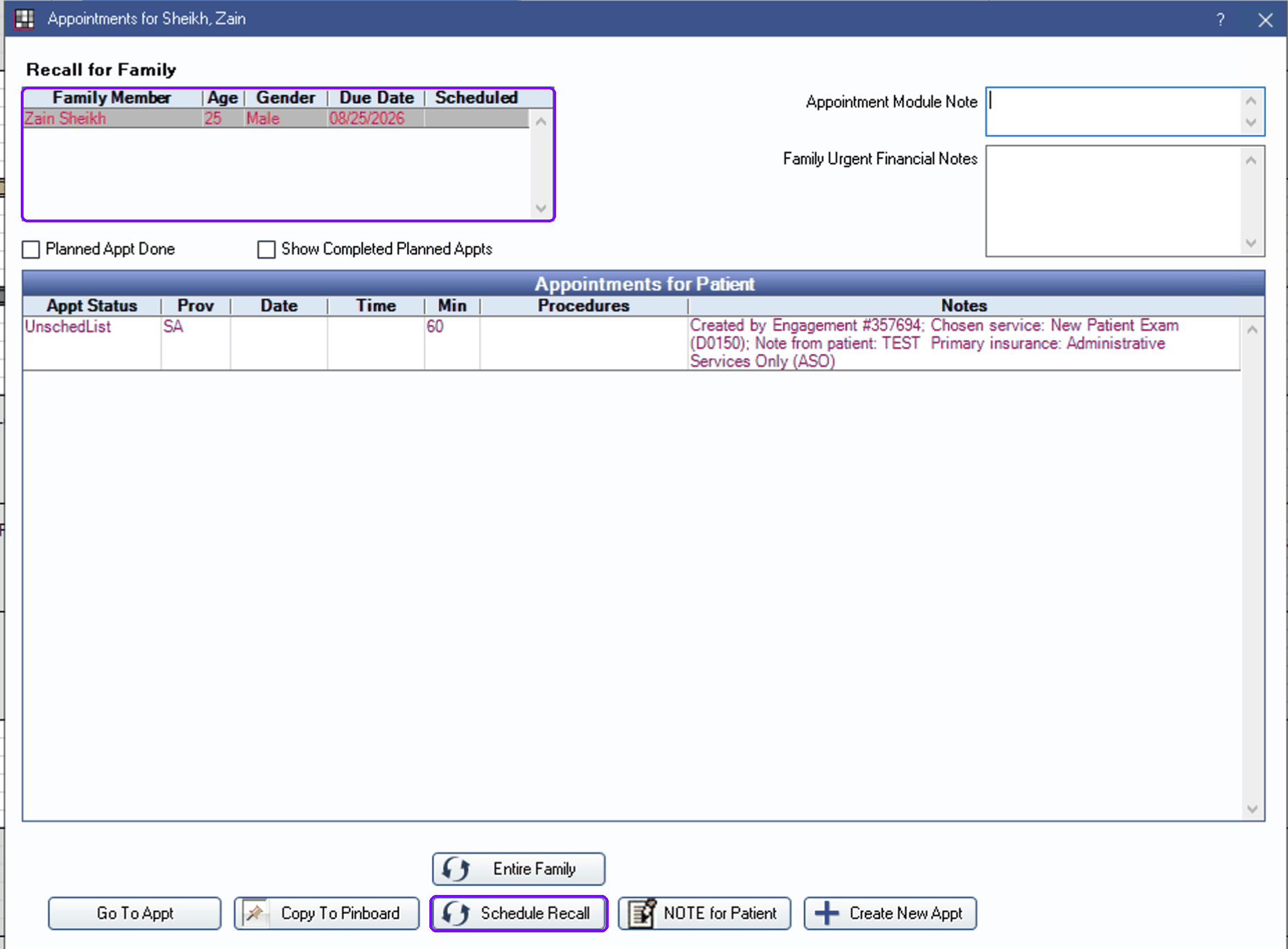
Here's that moment on a single patient: the whole family's recall in one grid, the overdue member in red. The Schedule Recall button is the close, turning the call into an appointment with the type, length, and due-date reset already handled.
A recall list nobody works is just a slow-motion report of patients becoming someone else's patients.
The multi-office problem
One office can run recall on a good habit and a good office manager. At three or more offices, the habits diverge: one office works the list daily, one prints it monthly, one filters it differently and swears their numbers are fine. The group's hygiene reactivation lives or dies on whichever office happens to be weakest, and nobody can see which one that is without reconstructing it by hand.
The fix is not more oversight, it's sameness: the same list logic, the same daily number, the same outcome statuses in every office, visible in one place. That's the operating idea behind our patient outreach engine, and it's the same idea whether you buy software or enforce it by hand. If the vocabulary here is new, the hygiene recall entry in our glossary covers the terms. And if the person working the list is new to the desk entirely, our 30-day front-office training plan sequences these screens week by week.
Recall List, from the Appointments module. Check the setup first: types attached to every active patient, prophy at six months plus one day, perio overrides maintained. Work it oldest first against a daily number, log an outcome on every call, and make every office do it the same way.
Where is the recall list in OpenDental?
Open the Recall List from the Appointments module. It shows every patient who is due or overdue for recall in the date range you set, based on their recall type and interval, with filters for provider, clinic, and recall status. If a patient is missing from the list, the usual reason is that no recall type is attached to them or their recall was disabled.
What recall interval should we set in OpenDental?
The interval is a clinical and practice decision, not a software rule. The common OpenDental convention is to set the prophy interval to six months plus one day so the next visit never lands a day before insurance eligibility. Perio maintenance patients typically run on a shorter interval set on their individual recall record. What matters for the list is that every active patient has a type and interval attached, whatever you choose them to be.
Why is my OpenDental recall list empty or impossibly long?
An empty list usually means recall types were never attached to patients, so nobody is ever due. An impossibly long one usually means years of due patients were never worked or dispositioned, so the backlog kept growing. Both are setup and habit problems rather than software problems: attach types to active patients, set a date range you will actually work, and log an outcome on every patient you call so the list cleans itself.
How often should the recall list be worked?
Daily, in a small fixed amount, beats monthly in a big push. A recall list ages the moment you pull it: patients book elsewhere, numbers go stale, and the front desk loses faith in it. A short list worked every morning, with outcomes logged, keeps hygiene chairs full without ever needing a recovery campaign.
Recall is the least glamorous system in the practice and the one that decides whether the schedule holds. Get the intervals right once, then protect the daily habit. The software part takes an afternoon; the habit is the actual work.
More from the library

Rather see it than read about it?
Book a 30-minute walkthrough and we will run it on your own offices.
or email us at info@mydentalforce.com